
Models & Pricing
Learn about EasyRouter's billing units, billing types (token-based and per-request), and how to read the Pricing Page.
EasyRouter features a fully transparent, pay-as-you-go billing mechanism. Real-time pricing, billing types, discounts, and compatible endpoints for all available models are publicly listed on the Model Hub.
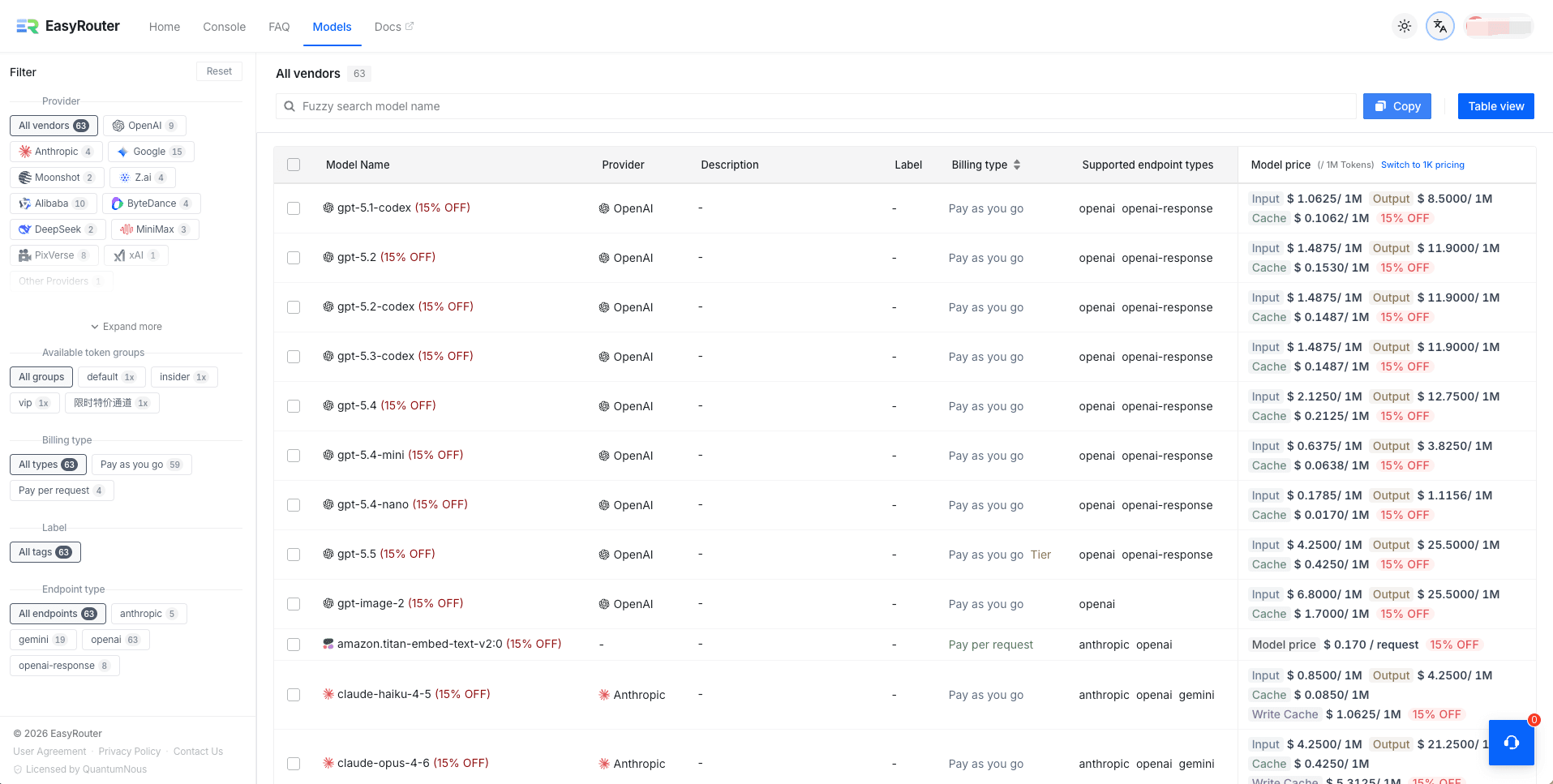
1. Understanding Model Pricing
On the Model Hub page, you can easily view the exact cost breakdown for every model:
1. Billing Types
Models on our platform are billed using one of two methods:
- Token-based Billing (Most Common): Billed based on the actual number of Input (Prompt) and Output (Completion) tokens consumed. Prices are shown per 1 Million Tokens (/ 1M Tokens) by default. You can toggle "Switch to 1K Price" in the top right to view pricing per 1,000 tokens instead.
- Per-request Billing: Some multimodal, tool-oriented, or special models (such as
amazon.titan-embed-text-v2:0) are billed at a flat rate per request (e.g.,Model Price $0.170 / Req). For these models, a fixed amount is deducted per call, regardless of the prompt or completion length.
2. Context Caching Rates
To help users drastically reduce costs for long-context tasks (such as chatting with large codebases or massive documents), EasyRouter offers granular caching rates for compatible models (e.g., Claude and Gemini series):
- Input: The standard price for uncached prompt tokens.
- Cache (Read Cache / Cache Hit): The discounted price for prompt tokens that hit the context cache. This is typically only 10% of the standard input rate.
- Write Cache (Cache Creation): The price for initially writing large blocks of text into the context cache.
3. Discounts
Real-time discount tags (e.g., (15% OFF) or 15% OFF) are displayed next to model names and prices. The system automatically calculates and displays the final discounted prices, so you don't need to do any math.
4. Filters and Endpoint Compatibility
- Available API Key Groups: Use the sidebar filter to switch between different API Key groups like
default,vip,insider, andLimited Promo Channel. Some groups offer dedicated low-cost routing or higher-performance fallback channels. - Compatible Endpoint Types: Displays the API protocol formats supported by the model, including
openai,openai-response,anthropic, andgemini. This means you can call the model using the respective provider's official SDK or formatting.
2. Credits and Conversion Rules
All API calls on EasyRouter are converted to system credits for real-time deduction.
Credit Conversion Formula
1 USD = 200 Credits (i.e., 1 Credit = 0.005 USD)
Token-based Billing Formula
When calling a token-billed model, the actual credits deducted for a single call are calculated as follows:
$$ Credits : Deducted = [ (Input : Tokens \times Input : Price) + (Output : Tokens \times Output : Price) + (Cached : Tokens \times Cache : Price) ] \times 200 $$
Note: Credits are automatically deducted from your account balance in milliseconds after the API call succeeds, based on the actual token Usage returned by the upstream provider.
3. Cost Optimization Best Practices
- Choose the Right Model: For tasks like code completion, formatting, or lightweight chats, we recommend highly cost-effective models like
deepseek-chatorgemini-2.5-flash. For complex logical reasoning and coding tasks,claude-3-5-sonnetis the premier choice. - Leverage Context Caching: In development tools (like Claude Code or Cline), try to keep the top of your prompts (such as system instructions and core file definitions) consistent. This allows you to frequently hit the cache, saving up to 90% of your input costs.
- Set Key-level Quota Limits: When creating API Keys, assign individual maximum quota limits to different keys (e.g., separate keys for development and testing). This prevents unexpected balance depletion due to code infinite loops or accidental runaway queries.