
Cursor
Connect to EasyRouter in Cursor. Cursor is the most popular AI-native code editor.
Only Cursor Pro and above subscription users can configure custom models and custom Base URLs. The free tier will result in errors.
Install Cursor
Go to the Cursor Official Website to download and install.
Configure EasyRouter
Open Settings
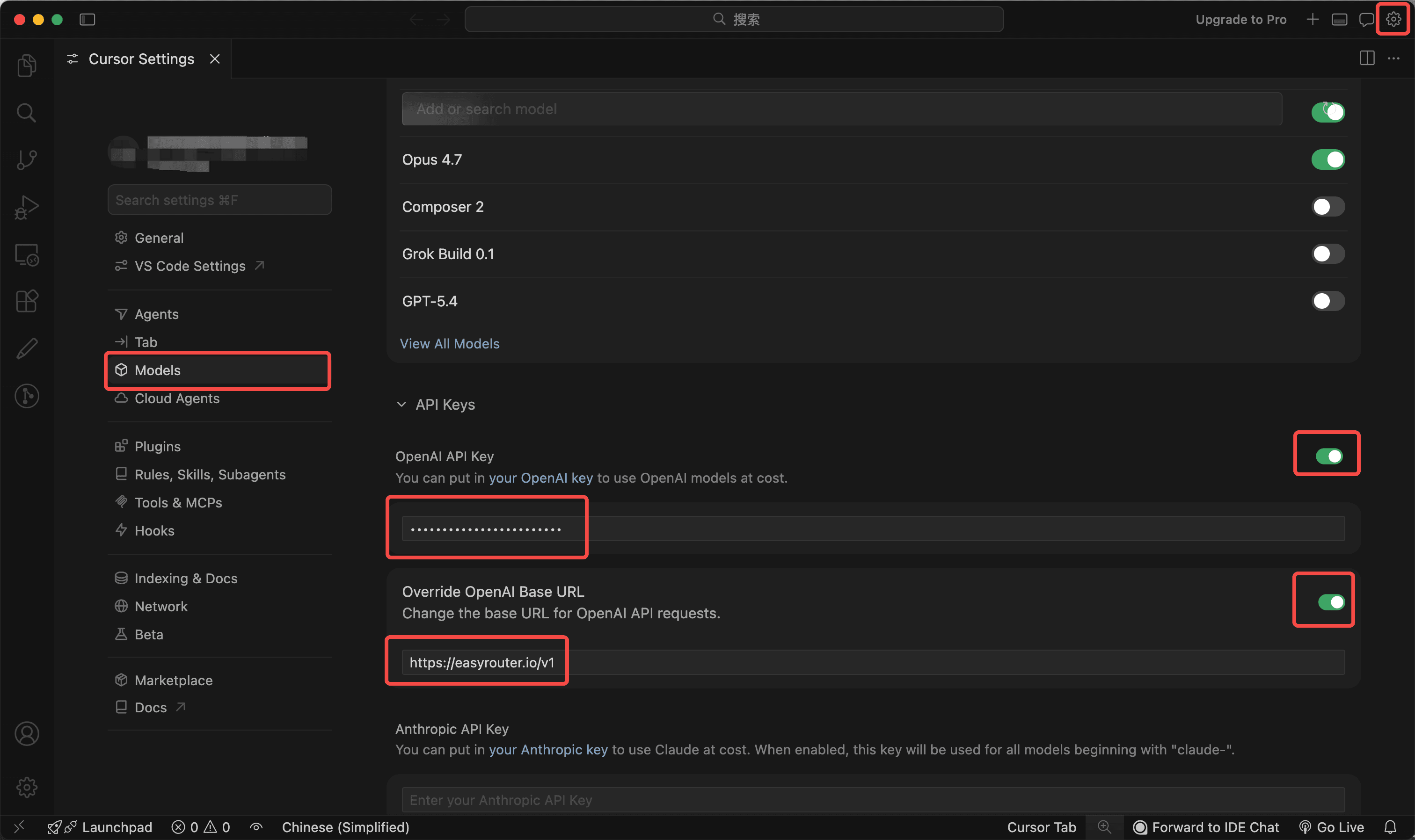
Click the settings icon (gear in the top right corner) in Cursor → Cursor Settings → Models page.
Configure API Key and Base URL
- Enable OpenAI API Key and enter your EasyRouter Token (API Key).
- Enable Override OpenAI Base URL and enter:
https://easyrouter.io/v1
Add Models
In the Add or search model input box, enter the model name you want to use (e.g., gpt-4o, claude-3-5-sonnet), and click Add Custom Model.
Start Using
Select the corresponding model in the chat panel to start using.
💡 Configuration Reference Screenshot
Below is a reference screenshot of a completed configuration:
Troubleshooting
Error The model xxx does not work with your current plan or api key.
You are currently using the Cursor free tier, which does not support custom models. Please upgrade to Cursor Pro or above.